
Get it out of your head.
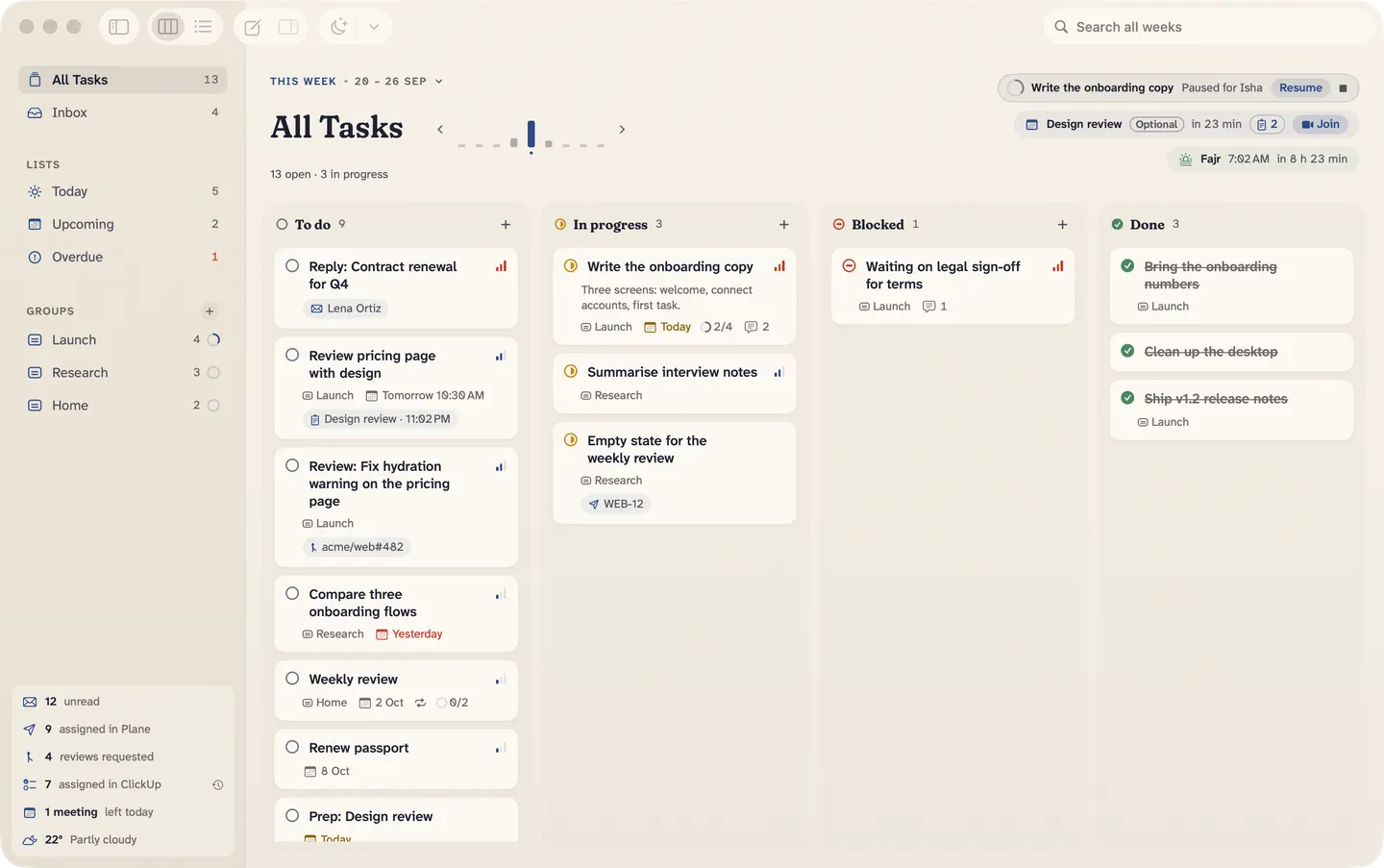
Board is RAM for your brain: one calm place on your Mac for everything you’re planning, and everything you keep checking.
14-day free trialOne-time purchaseNo accountmacOS 26 Tahoe
You’re holding too much.
- The meeting in 20 minutes.
- The email you haven’t answered.
- The review someone’s waiting on.
- What you promised for Friday.
Put it all on one board.
Quick capture
Dump it.
Type it like you’d say it.
Board files it.
⌃⌥⌘Nfrom any app, any time.
Glances
Stop checking.
Your next meeting, unread mail, what’s waiting in ClickUp, Plane and GitHub, prayer times and the weather. One quiet glance, kept fresh for you.
- 12 unread
- 9 assigned in Plane
- 4 reviews requested
- 7 assigned in ClickUp
- 1 meeting left today
- 22° Partly cloudy
The week
One board. The whole week.
To do, In progress, Blocked, Done. Move a card and it’s moved. Look back at last week, plan the next, and carry what’s left.
This weekLast week•20 – 26 Sep13 – 19 Sep
All Tasks
10 open · 3 in progress1 open Move 1 unfinished to this week
Three screens: welcome, connect accounts, first task.
Ambient mode
Stay calm.
When you step away, your Mac becomes a window.




The 40-second tour.
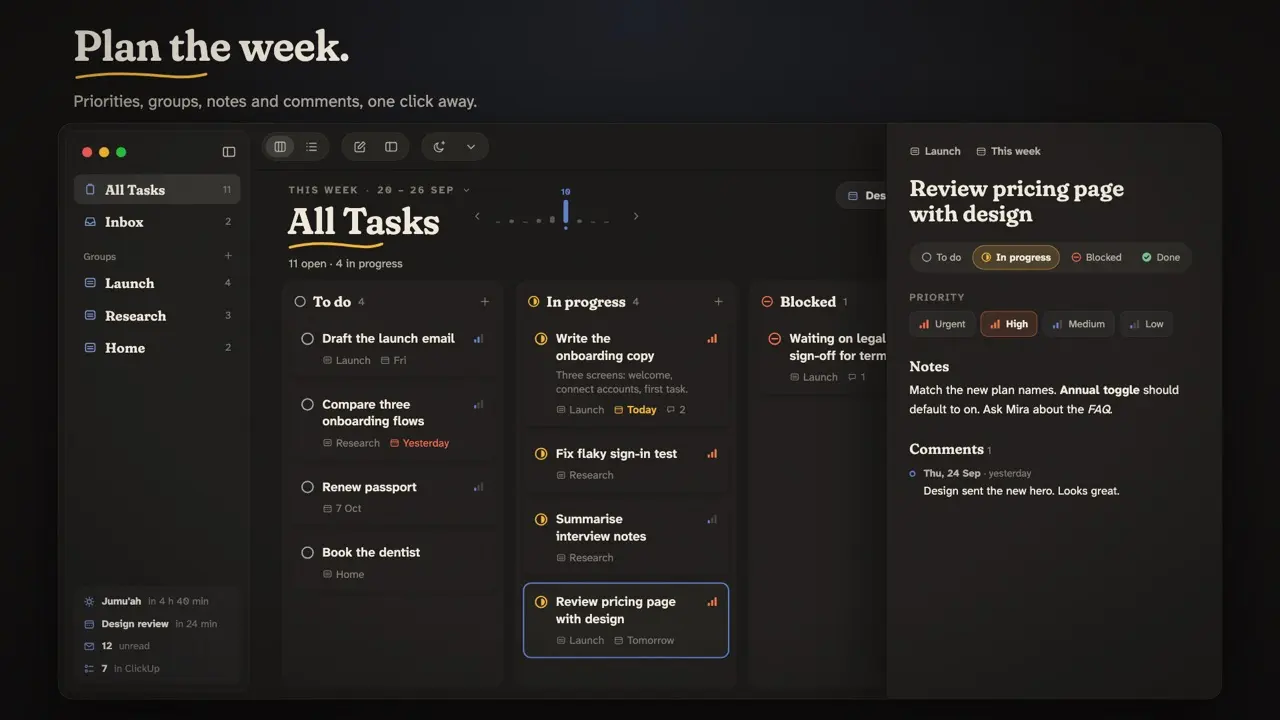
Plan the week, capture a thought, glance at what’s waiting, and step away.
Everything else.
Everything about a task, in one place.
Notes, a checklist, a log of your progress, and the time you’ve focused on it.
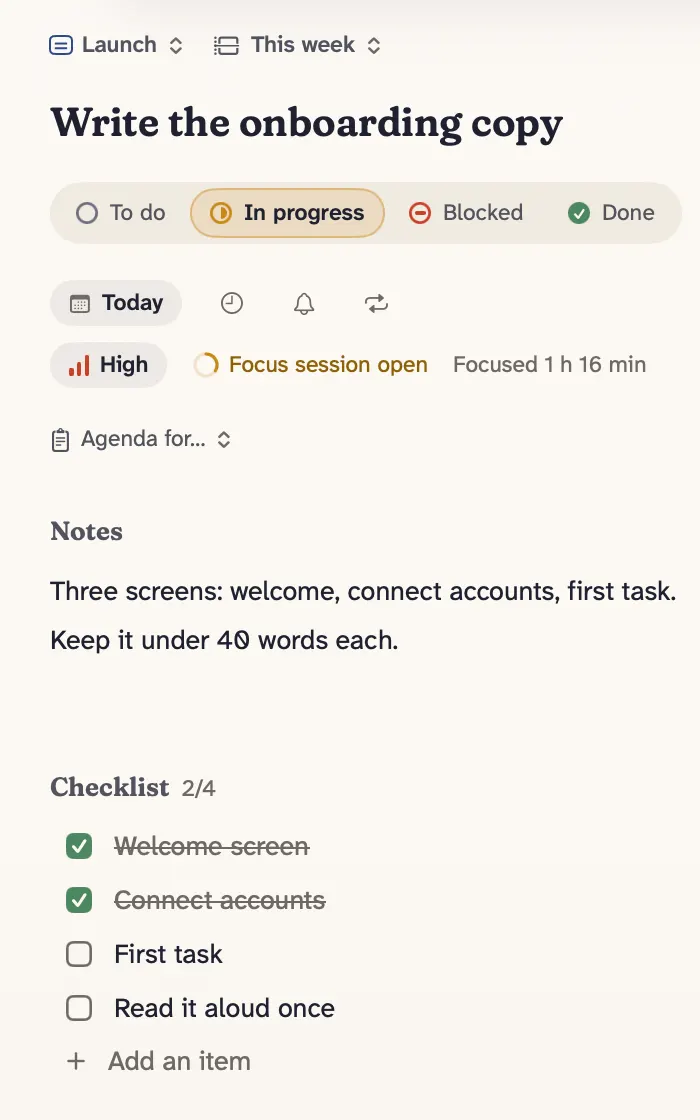
Focus sessions
Time one task. It ends gently before a meeting, and pauses for prayer.
Prayer times & chime
Worked out on your Mac, with a soft chime at the prayers you choose.
Menu bar & widgets
Your next meeting and today’s work, without opening Board.
⌘K for everything
Every task, week and action, a few keystrokes away.
Undo everything
Even a delete. ⌘Z puts it back.
Weekly review
What got done, what’s still open, and a note for the week.
Repeating tasks
Every weekday, every other Friday, or the 15th of each month.
Reminders
Mark done or snooze right from the notification.
Checklists
Small steps inside a task, ticked off as you go.
Meeting agendas
Put tasks on a meeting’s agenda, and see what’s left to cover.
Smart lists
Today, Upcoming and Overdue, across every week.
VoiceOver & Reduce Motion
Every card reads as one clear sentence. Motion stays still when you ask.
AI assistants
Ask about your week.
Claude, Codex or any MCP app on your Mac can read your board, see what’s waiting in Plane or GitHub and on your calendar, and make tasks for you. It uses its own subscription; Board needs no account.
- Let AI assistants read your boardTasks, groups, weeks, today
- …and make changesAdd, edit, complete, move
- …and see your connections’ itemsPlane, GitHub, your calendar
Each one is off until you turn it on. Every change is one undo step, named for the assistant: ⌘Z takes it back.
- You: What’s on today, and what’s waiting for me in Plane?
- Board todaylist_work_items
- Assistant: Two tasks are due today, starting with “Write the launch copy”. Your design review is at 3:00 PM, with a Meet link. In Plane, 9 issues are assigned to you; WEB-12, “Fix the login bug”, is in progress.
- You: Make WEB-12 a task for Friday.
- Board create_task
- Assistant: Done. It’s in your Inbox, linked back to WEB-12.Fix the login bugWEB-12
Privacy
Your mind stays on your Mac.
No account
Download it and start. There’s nothing to sign up for.
No cloud
Your tasks live on your Mac. Integrations talk straight to the services you connect.
No tracking
No analytics, no ads. Board sends nothing about you to us.
Pricing
$29. Once.
- 14-day free trial, no card needed.
- Use it on up to 3 Macs.
- All 1.x updates included.
- After the trial, your board stays readable until you buy.
Checkout opens very soon. Start the free trial today: when you buy, the same board simply carries on.
Questions.
Something else? Write to us.
What do I need?
A Mac with macOS 26 Tahoe or later.
Does it sync between Macs?
Not yet. Board keeps everything on this Mac.
What happens after the trial?
Board carries on, read-only: every task stays visible and searchable, and your glances, ambient mode and focus sessions keep working. Nothing is lost or hidden. Buy a license and you can edit again, right where you left off.
Which calendars work?
It reads the Mac’s Calendar app, so any Google, iCloud, Exchange or other account you’ve added to macOS works.
Does it work with Gmail?
Yes, for your unread count, through your own Google client: Settings ▸ Accounts ▸ Advanced. The app links to a step-by-step guide. Board reads labels and headers, never message bodies.
What about ClickUp, Plane and GitHub?
Connect each with a personal token. Board only reads: what’s assigned to you, and the reviews waiting for you. It never writes back.
Which AI assistants work with Board?
Claude Desktop, Claude Code, Codex, and any other app that speaks the Model Context Protocol (MCP). Turn it on in Settings ▸ Connections ▸ AI assistants, where each assistant’s setup is ready to copy. The assistant runs on your Mac and talks to Board directly; what it reads goes to its own service, such as Anthropic or OpenAI, never to us.
Can I get a refund?
If Board isn’t for you, email us within 30 days for a full refund. Refund policy
Who makes Board?
Board is made by Yahia Salem, an independent developer.
Get it out of your head.
14-day free trialOne-time purchaseNo accountmacOS 26 Tahoe